+1 (630) 296 6606
 +1 (630) 615-1784
 +91 (79) 48904529
 +48 (730) 059 665
 reach@techforceglobal.com




How to Extract LinkedIn Candidate Data Without Cookies or Login Credentials
Introduction
Building candidate lists from LinkedIn is one of the most common tasks in recruitment and one of the most time consuming when done manually. Searching by job title, scrolling through results, clicking into profiles, and copying names and URLs into a spreadsheet takes hours for a list that would take seconds to generate with the right tool.
Most LinkedIn scrapers require session cookies meaning you must be logged in, expose your account, and risk having it flagged or restricted by LinkedIn. The LinkedIn Candidate Scraper by Techforce Global works without cookies or login credentials, removing that risk entirely.
This article explains how it works, what data it extracts, and how recruitment and HR teams use it to build candidate pipelines faster.
The Problem With Manual LinkedIn Candidate Research
LinkedIn is the world’s largest professional network and the default starting point for sourcing candidates across virtually every industry and role type. But LinkedIn’s native search and export tools are built for individual use, not bulk candidate list building.
The manual process: search by job title or keyword → scroll through results → click into each profile → copy name, title, company, and URL → paste into a spreadsheet → repeat. For 50 candidates this takes half a day. For 200 it takes the better part of a week.
Most automation solutions require you to log in and provide session cookies, which exposes your LinkedIn account and creates a risk of restriction. This actor takes a different approach.
No cookies. No login. No account risk. Just clean LinkedIn candidate data extracted automatically and structured for immediate use.

What the LinkedIn Candidate Scraper Extracts
The actor extracts publicly available LinkedIn candidate data without requiring cookies or session authentication:
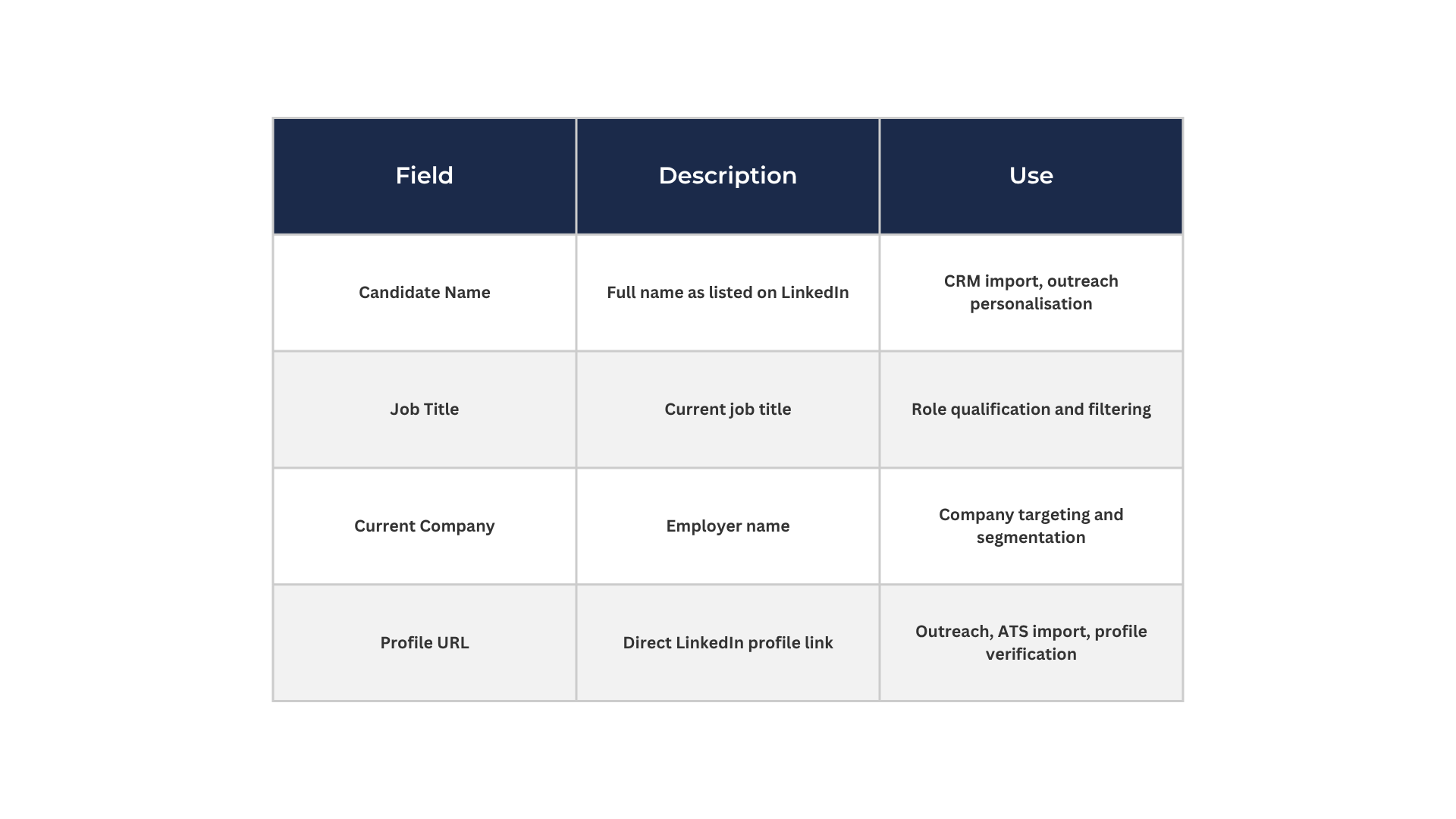
Output is available in JSON, CSV, or Excel clean and importable directly into your ATS, CRM, or outreach platform.

How to Use It — Step by Step
- Go to: https://apify.com/techforce.global/linkedin-candidate-search
- Click ‘Try for Free’
- Enter your LinkedIn search URL (e.g. search by job title + location)
- Set your maximum results limit
- Click Run
- Export as JSON, CSV, or Excel for CRM or ATS import
Who Uses This Actor
Recruiters and Talent Acquisition Teams
Build structured candidate lists by role, location, and industry in minutes. Export directly to your ATS or outreach platform. No manual copy-paste, no cookie exposure, no LinkedIn account risk.
HR Departments Running Bulk Searches
When hiring for multiple roles simultaneously, HR teams can run separate searches for each position and have structured candidate lists ready for each hiring manager all without manual LinkedIn searching.
Staffing and Recruitment Agencies
Agencies working across multiple clients and job categories use this actor to generate candidate pools at scale. The structured CSV output makes it straightforward to sort, filter, and assign candidates across client mandates.
Sales Teams Sourcing Specific Role Types
B2B sales teams that target specific job titles heads of procurement, IT managers, finance directors use this actor to build targeted prospect lists from LinkedIn without manual searching.
Rating
5.0 stars on Apify. Rated by verified users.
Pricing
Pay per use on Apify. No monthly subscription required.
🔗 Try the LinkedIn Candidate Scraper: https://apify.com/techforce.global/linkedin-candidate-search
📅 Book a consultation: https://calendly.com/techforce-infotech-pvt-ltd/intro-meeting
� More tools: https://techforceglobal.com
Related Articles
- All Events Scraper : Automate Event Data From AllEvents.in → https://techforceglobal.com/blog/how-to-automate-event-data-collection-from-allevents-in-without-manual-searching/
- Events Eye Scraper : Global Trade Show Data → https://techforceglobal.com/blog/how-to-automate-global-trade-show-data-collection-from-eventseye-com/
- Y Combinator Founder Scraper → https://techforceglobal.com/blog/how-to-automate-yc-founder-research-with-automatic-linkedin-profile-matching/
Â
 Akshit Trivedi
29 Apr 2026
Akshit Trivedi
29 Apr 2026